
Buy Oddsparks: An Automation Adventure – Deluxe Edition / LATAM
Platform:
Windows
Genre:
Adventure, Indie, Simulator, Strategies
Publisher:
HandyGames
Activation:
Steam
Release Date:
27 may 2025
Languages:
English
Type:
Key
Region:
LATAM
20.00 USD
 In stock
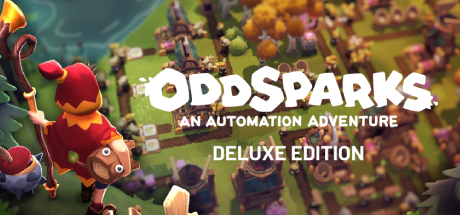
Oddsparks: An Automation Adventure – Deluxe Edition is a single-player and co-op automation game that blends logistics strategy with real-time strategy (RTS) elements.
Deluxe Edition Content
This edition includes the base game and the Deluxe Upgrade Pack, which features exclusive cosmetic items:
- Royal Supporter Outfit: Royal Cape, Royal Pants, Royal Skirt, Royal Boots, Supporter Crown, and Royal Brooch.
- Corrupted Spark Supporter Outfit: Corrupted Cape, Corrupted Shorts, Corrupted Slippers, Corrupted Headwear, and Corrupted Brooch.
- Golden Spark Statues: Decorative monuments for every Spark type (Carry Spark, Choppy Spark, Boomy Spark, etc.) to place around your base.
Key Gameplay Features
- Automation via Creatures: Instead of conveyor belts, you design and optimize supply chains using cute, craftable magical creatures called Sparks.
- Exploration and RTS Combat: Discover procedurally generated biomes, uncover ancient secrets, and command your Sparks in battle against unique fantasy creatures like Beelephants.
- Co-op Multiplayer: Build logistics networks and explore the vibrant world alone or with friends in online co-op mode.
- Minimum:
- Requires a 64-bit processor and operating system
- OS: Windows 10 64bit
- Processor: Intel Core i5 / AMD FX-6300
- Memory: 8 GB RAM
- Graphics: GTX 970 4GB / Radeon RX580 4GB or better
- DirectX: Version 11
- Storage: 6 GB available space
- Recommended:
- Requires a 64-bit processor and operating system
- OS: Windows 10 64bit
- Processor: Intel i7 / AMD Ryzen 7
- Memory: 8 GB RAM
- Graphics: GTX 1070 4GB / Radeon RX 5700-XT 4GB or better
- DirectX: Version 11
- Storage: 6 GB available space
If you are not familiar with the technical information of your PC, download the CPU-Z program. CPU-Z will give you detailed information about the main system components - CPU, RAM, video card - installed on your system, which you can then compare with the minimum requirements of the game.
- Go to: http://store.steampowered.com/ and download STEAM client
- Click "Install Steam" (from the upper right corner)
- Install and start application, login with your Account name and Password (create one if you don't have).
- Please follow these instructions to activate a new retail purchase on Steam:
- Launch Steam and log into your Steam account.
- Click the Games Menu.
- Choose Activate a Product on Steam...
- Follow the onscreen instructions to complete the process.
- After successful code verification go to the "MY GAMES" tab and start downloading.
Videos & Screenshots




- Payments
-

-

-

-

-

-

-

-

-
