
Buy Clair Obscur: Expedition 33 Deluxe Edition / LATAM
Platform:
Windows
Genre:
RPG, Action
Publisher:
Kepler Interactive
Activation:
Steam
Release Date:
24 april 2025
Languages:
English
Type:
Key
Region:
LATAM
42.00 USD
 In stock
Extra Content
Clair Obscur: Expedition 33 / LATAM required to run
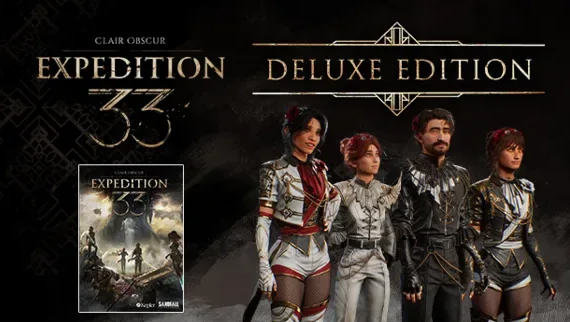
Lead the Expedition in style with the Deluxe Edition Upgrade.
It includes:
- The “Flowers” Collection - Six outfits and hairstyles inspired by the Flowers of Lumière, along with six additional “Gommage” outfit variations. One for each playable character.
- “Clair” - A custom outfit for Maelle
- “Obscur” - A custom outfit for Gustave
- Minimum:
- Requires a 64-bit processor and operating system
- OS: Windows 10
- Processor: AMD Ryzen 5 1600X Six-Core
- Memory: 8 GB RAM
- Graphics: NVIDIA GeForce GTX 1070 Ti
- DirectX: Version 12
- Storage: 55 GB available space
- Additional Notes: These are subject to change
- Recommended:
- Requires a 64-bit processor and operating system
- OS: Windows 11
- Processor: AMD Ryzen 5 7600X Six-Core
- Memory: 16 GB RAM
- Graphics: NVIDIA GeForce RTX 3070
- DirectX: Version 12
- Storage: 55 GB available space
- Additional Notes: These are subject to change
If you are not familiar with the technical information of your PC, download the CPU-Z program. CPU-Z will give you detailed information about the main system components - CPU, RAM, video card - installed on your system, which you can then compare with the minimum requirements of the game.
- Go to: http://store.steampowered.com/ and download STEAM client
- Click "Install Steam" (from the upper right corner)
- Install and start application, login with your Account name and Password (create one if you don't have).
- Please follow these instructions to activate a new retail purchase on Steam:
- Launch Steam and log into your Steam account.
- Click the Games Menu.
- Choose Activate a Product on Steam...
- Follow the onscreen instructions to complete the process.
- After successful code verification go to the "MY GAMES" tab and start downloading.
Videos & Screenshots


Recommended






- Payments
-

-

-

-

-

-

-

-

-
