
Buy Amber Isle - Gold Edition / Africa / Middle East
 In stock
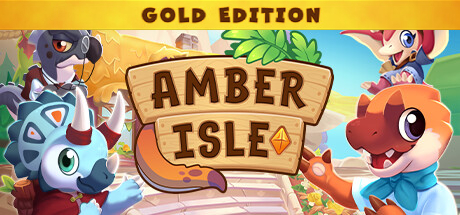
Amber Isle - Gold Edition is the ultimate premium version of the cozy dinosaur shop-management game. It expands heavily on the Deluxe Edition by adding both digital collectibles and the soundtrack alongside the cosmetic bonuses.
📦 What is Included in the Gold Edition?
The Gold Edition includes everything from the base game and previous tiers, packed into one bundle:
Amber Isle Base Game
Starter Pack DLC:
10 unique character outfits for avatar customization.
6 exclusive wallpaper designs for your shop walls.
A special cross-over decorative item inspired by Worms.
Digital Artbook: A downloadable book featuring behind-the-scenes concept art and visual designs of the prehistoric world.
Official Soundtrack (OST): The complete, relaxing digital music tracks from the game.
- Minimum:
- Requires a 64-bit processor and operating system
- OS: Windows 10 64 bit
- Processor: Intel Core i5-6600K or AMD Ryzen 3 1200
- Memory: 8 GB RAM
- Graphics: NVIDIA GeForce GTX 550 Ti, 2GB or AMD Radeon HD 7750, 2GB
- DirectX: Version 10
- Storage: 2 GB available space
- Additional Notes: Low 1080p @ 30 FPS
- Recommended:
- Requires a 64-bit processor and operating system
- OS: Windows 10 64 bit
- Processor: Intel Core i5-6600K or AMD Ryzen 3 1200
- Memory: 12 GB RAM
- Graphics: NVIDIA GeForce GTX 560 Ti, 2GB or AMD Radeon R7 260X, 2GB or Intel Arc A310, 4GB
- DirectX: Version 12
- Storage: 4 GB available space
- Additional Notes: High 1080p @ 60 FPS
If you are not familiar with the technical information of your PC, download the CPU-Z program. CPU-Z will give you detailed information about the main system components - CPU, RAM, video card - installed on your system, which you can then compare with the minimum requirements of the game.
- Go to: http://store.steampowered.com/ and download STEAM client
- Click "Install Steam" (from the upper right corner)
- Install and start application, login with your Account name and Password (create one if you don't have).
- Please follow these instructions to activate a new retail purchase on Steam:
- Launch Steam and log into your Steam account.
- Click the Games Menu.
- Choose Activate a Product on Steam...
- Follow the onscreen instructions to complete the process.
- After successful code verification go to the "MY GAMES" tab and start downloading.
Videos & Screenshots


Recommended





- Payments
-

-

-

-

-

-

-

-

-
